How to Organise a Gaming Party?
Organising a gaming party is simple when you plan the number of guests, choose suitable games, prepare enough screens and consoles, and make sure there’s plenty of space for everyone to play comfortably. Many parents also choose a professional gaming party company, which supplies the equipment, setup, and party host, making the experience completely stress-free.
Choose the Right Games
Choosing the right games is one of the most important parts of organising a successful gaming party. The best games are those that are easy to pick up, encourage friendly competition, and are suitable for the age group of your guests. It’s also worth selecting games that support local multiplayer so everyone can take part without long waiting times.
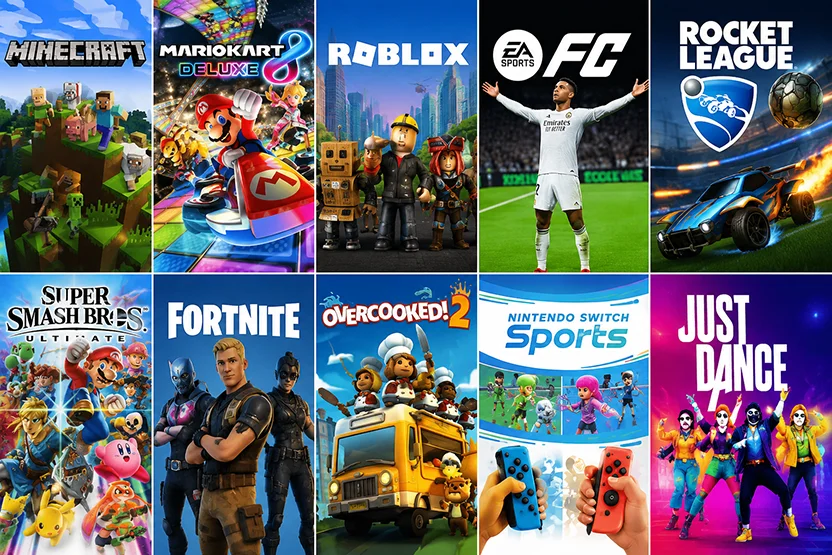
Fortnite
Fortnite is one of the world’s most popular multiplayer games and is ideal for older children and teenagers. It offers exciting team-based gameplay and creative game modes, making it perfect for parties. Due to its cartoon-style combat, Fortnite is generally recommended for children aged 12 years and over, although parents should always make the final decision.
Minecraft
Minecraft is an excellent choice for younger children because it encourages creativity, teamwork, and problem-solving. Players can build, explore, and complete challenges together in a safe and engaging environment. It is suitable for ages 7+ and is one of the most requested games for children’s gaming parties.
Mario Kart
Mario Kart is a fantastic party game that appeals to both children and adults. With colourful graphics, simple controls, and fast-paced races, it’s easy for everyone to join in, even if they’ve never played before. Mario Kart is suitable for ages 3+ and works brilliantly for mixed-age parties.
EA Sports FC (formerly FIFA)
Football games are always popular at gaming parties, especially for children who enjoy sport. EA Sports FC allows players to compete in quick matches and mini tournaments, making it perfect for friendly competition. The game is generally suitable for ages 3+.
Roblox
Roblox offers thousands of different games, allowing players to choose experiences that match their interests. From obstacle courses to racing and adventure games, there’s something for almost everyone. Roblox is generally suitable for ages 7+, although parental supervision and age-appropriate game selection are recommended.
When planning your gaming party, always choose games that match the age and interests of your guests. A balanced selection of racing, sports, creative, and multiplayer games helps keep everyone entertained throughout the event.
Decide How Many Players
One of the first things to consider when organising a gaming party is how many children will be attending. The number of players affects the equipment required, the games you choose, and how smoothly the event runs. While it’s possible to host larger groups, ensuring every child gets plenty of playing time is the key to keeping everyone engaged.
Gaming Party for 8 Guests
A party with 8 guests is ideal for smaller birthday celebrations and home events. With multiple consoles and screens, everyone can play together or rotate between different games without long waiting times. This size allows for a relaxed atmosphere where children have plenty of opportunities to take part in tournaments and multiplayer games.
Gaming Party for 12 Guests
A 12-player gaming party is one of the most popular choices. It offers a great balance between competition and social interaction, making it perfect for birthdays and family celebrations. Team games, racing tournaments, and football competitions work particularly well with this number of players, ensuring everyone stays involved throughout the event.
Gaming Party for 16 Guests
If you’re expecting a larger group, a 16-player gaming party provides an exciting tournament-style experience. With enough gaming stations and a variety of multiplayer games, children can compete in teams, rotate between different activities, and enjoy a lively party atmosphere. Larger parties benefit from professional equipment and an organised setup to ensure everyone has a chance to play without unnecessary waiting.
No matter how many guests you invite, choosing a gaming party provider with enough consoles, screens, and controllers will help ensure every child enjoys the experience. Careful planning allows the party to run smoothly and keeps the focus on fun rather than waiting for a turn.
Set Up the Gaming Area
A well-organised gaming area helps keep the party running smoothly and ensures every guest has a great experience. Before the party starts, make sure you have enough equipment, seating, and power available for all players.
TVs and Screens
Large TVs or gaming monitors provide the best experience, allowing everyone to see the action clearly. If you’re hosting multiple players, using several screens helps reduce waiting times and keeps more children involved throughout the party.
Games Consoles
Choose consoles that support local multiplayer, such as PlayStation, Xbox, or Nintendo Switch. Make sure each console has enough controllers and that all games are installed and updated before your guests arrive to avoid delays.
Internet Connection
While many party games can be played offline, a stable internet connection is useful for online multiplayer games and downloading any last-minute updates. If you’re relying on Wi-Fi, test the connection before the event begins.
Comfortable Seating
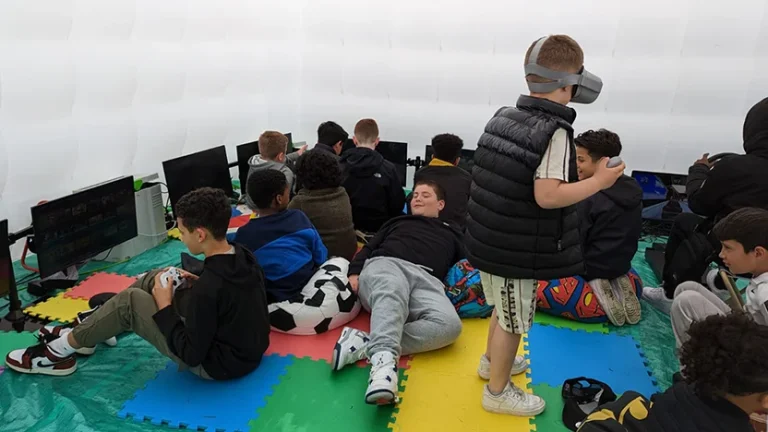
Children may spend several hours gaming, so comfortable seating is important. Arrange chairs or beanbags so every player has a clear view of the screen while leaving enough space for movement between gaming stations.
Extension Leads and Power
Gaming equipment requires multiple power sockets, so extension leads are often essential. Position cables safely along walls or under cable covers to reduce trip hazards and ensure every console, TV, and accessory has a reliable power supply throughout the party.
If you don’t have your own equipment, a home gaming party service can bring everything needed directly to your house, including consoles, screens, and experienced party hosts.
Food Ideas
Choosing the right food helps keep the gaming equipment clean and the party running smoothly. Finger foods that are easy to eat without leaving greasy or sticky residue are the best option.
Controller-Friendly Foods
Mini sandwiches
Pizza slices
Chicken nuggets
Cocktail sausages
Cheese cubes
Carrot and cucumber sticks
Grapes
Apple slices
Popcorn (lightly salted)
Pretzels
Rice cakes
Breadsticks
Foods to Avoid
Some foods can leave controllers sticky or greasy, making them unpleasant to use. It’s best to avoid:
Crisps with heavy seasoning
Chocolate
Doughnuts
Ice cream
Sticky sweets
Saucy foods
Greasy burgers
Barbecue wings
Drinks
Provide bottled water or drinks with lids where possible to reduce the risk of spills. Small juice cartons and squash in cups with lids are also good choices for younger children.
Keeping a few napkins or wet wipes nearby encourages children to clean their hands before picking up a controller, helping to protect the gaming equipment and keep everyone playing comfortably throughout the party.
Decorations
Decorations help create an exciting atmosphere and make the party feel extra special. Choosing a theme based on your child’s favourite games is a great way to personalise the event and impress guests.
Popular Gaming Themes
Popular gaming party themes include Minecraft, Fortnite, Roblox, Mario Kart, and EA Sports FC. Matching balloons, banners, tableware, and party bags can help bring the theme together and create a memorable experience.
Create a Gaming Atmosphere
Use LED lighting, gaming posters, themed tablecloths, and colourful balloons to transform the party space. If possible, display the games on screens before guests arrive to build excitement as they enter.
Keep Decorations Practical
Avoid placing decorations where they could block screens, interfere with cables, or restrict movement around the gaming stations. Keeping the play area tidy ensures children can move safely while enjoying the games.
With a few well-chosen decorations and a clear gaming theme, you can create a fun and immersive party environment that children will remember long after the event is over.
Should You Hire a Gaming Party Company?
Hiring a professional gaming party company is one of the easiest ways to organise a successful gaming party. Instead of sourcing equipment, setting everything up, and entertaining the children yourself, an experienced provider takes care of the entire gaming experience, allowing you to relax and enjoy the celebration.
No Equipment to Buy
There’s no need to purchase expensive consoles, TVs, controllers, or gaming accessories. Everything needed for the party is provided, saving you both time and money.
No Setup Required
A professional gaming party company will deliver, install, and test all the equipment before your guests arrive. Once the party is over, everything is packed away, leaving you with nothing to tidy up.
Experienced Party Hosts
Professional hosts keep the party running smoothly by organising tournaments, helping players, and ensuring everyone gets involved. This creates a fun and inclusive experience for children of all abilities.
The Latest Games and Consoles
Most gaming party providers supply the latest PlayStation, Xbox, and Nintendo consoles, along with a wide selection of age-appropriate games, so every guest has something they’ll enjoy.
A Stress-Free Experience
Perhaps the biggest advantage is peace of mind. With the equipment, entertainment, and organisation taken care of, you can spend more time celebrating with your child while the professionals ensure the party is enjoyable from start to finish.
If you’re considering hiring a professional provider, it’s worth comparing gaming party prices to see what’s included in different packages before making a decision.
FAQ
How long should a gaming party last?
What games are best for 8-year-olds?
How many consoles do I need?
Can gaming parties be held at home?
Do gaming party companies provide TVs?
What's included in a gaming party package?
How much space do I need?
What if it rains?
Can girls enjoy gaming parties?
What food should I serve?
What are the most popular party games?
How many children can play at once?
How much does a gaming party cost?
Do parents need to supervise?
Are gaming parties suitable for schools?
Related Blog posts
What Do I Need for a Gaming Party?…
Planning a gaming party sounds simple, but many parents quickly realise there…
How many children can play at once?
Quick Answer: The number of children who can play at once depends…
What games are best for a gaming party?
Quick Answer The best games for a gaming party are those that…